
Getting Started with Industrial Automation
If you’re new to robotics programming or industrial automation, jumping into the world of real-time control systems can feel overwhelming. Fortunately, Programmable Logic Controllers (PLCs) offer a powerful and accessible starting point.
This guide will walk you through the basics of PLCs and provide a simple example using a traffic light controller, so you can begin programming your own automation systems even with little experience.
In this article, you’ll learn:
- What a PLC is and how it works
- The basics of PLC programming languages (IEC 61131-3 standard)
- Common functions like Set/Reset and TON timers
- A practical traffic light control example in Function Block Diagram (FBD)
By the end, you’ll be ready to start building your own PLC control logic — even with minimal experience.
What Is a PLC (Programmable Logic Controller)?
A PLC is a ruggedized computer specifically designed for real-time control of machinery and industrial equipment. It excels at:
- Fast input/output processing
- Predictable behavior
- Continuous scanning and logic execution
PLCs are widely used in assembly lines, robotics, HVAC systems, and safety mechanisms—anywhere where rapid and deterministic response is essential.
Introduction to PLC Programming Languages (IEC 61131-3)
You normally have a choice among multiple PLC programming languages specified in the IEC 61131 standard. The standard includes five PLC programming languages that include Structured Text, Ladder Diagram, Function Block Diagram, Sequential Function Chart, and Instruction List, though Instruction List is deprecated and not used in modern PLCs. I will discuss the first four of those IEC 61131 standard languages, but keep in mind that there may be more options or variations of these options depending on the PLC.
While it is possible to implement all or most of a PLC program in a single language, it is often better to use a combination of languages to take advantage of each of their benefits. Multiple lines or blocks of code in one language could be reduced to a single line or block in another.
Overview of Common PLC Languages
| Language | Type | Best For |
|---|---|---|
| Structured Text (ST) | Text-based | Loops, math, conditionals |
| Ladder Diagram (LD) | Graphical | Electrically intuitive logic |
| Function Block Diagram (FBD) | Graphical | Visual programming, beginner-friendly |
| Sequential Function Chart (SFC) | Graphical | Step-based sequences, state machines |
Structured Text (ST)

Structured Text (ST) is the programming language that is most similar to programming in BASIC or C. The biggest advantage to this language is being able to perform mathematical operations most efficiently. It is also ideal for features like if statements and for loops.
Ladder Diagram (LD)
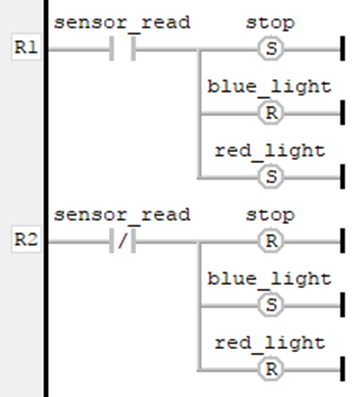
A Ladder Diagram (LD) is a graphical programming language modeled after electrical connections. Using Ladder Diagrams is especially intuitive for electrical engineers and is the most common seen in PLCs. At a minimum, even the cheapest PLCs should support LD and ST, if not any other languages.
Function Block Diagram (FBD)

Function Block Diagram (FBD) for PLCs is a higher-level graphical programming language with an emphasis on processing data through function blocks. This is generally a more intuitive PLC language. Depending on how well the programmer organizes the program structure, even those with no programming experience should be able to follow what the program is doing. However, while intuitive, the Function Block Diagram approach is not as efficient a language as ST or LD in many cases.
Considering the intuitiveness of this language, the examples below are all using FBD.
Sequential Function Chart

Sequential Function Charts are another high-level graphical programming language that is specialized to only model sequential processes and not write control logic. It does not support many of the features of the other PLC programming languages, such as data structures, loops, or conditions. Instead, this is the ideal language to implement a state chart, while low-level control logic is programmed in a different language.
Many PLC programs mix languages to leverage the strengths of each, and it is a very common approach to do so. For example, you might use LD for inputs/outputs, ST for math, and SFC for process control.
Programming Basics: Boolean Logic, Set/Reset, and Timers
The best place to start when learning PLC programming is Boolean variable manipulation. Booleans, or binary on-off variables, are often the most widely used variables on a PLC. Booleans can control which step of sequence is active, as well as describe the system status.
Set/Reset
Common bit operations are setting and resetting. These operations are important for allowing a Boolean to retain its value after a particular sequence is inactive.
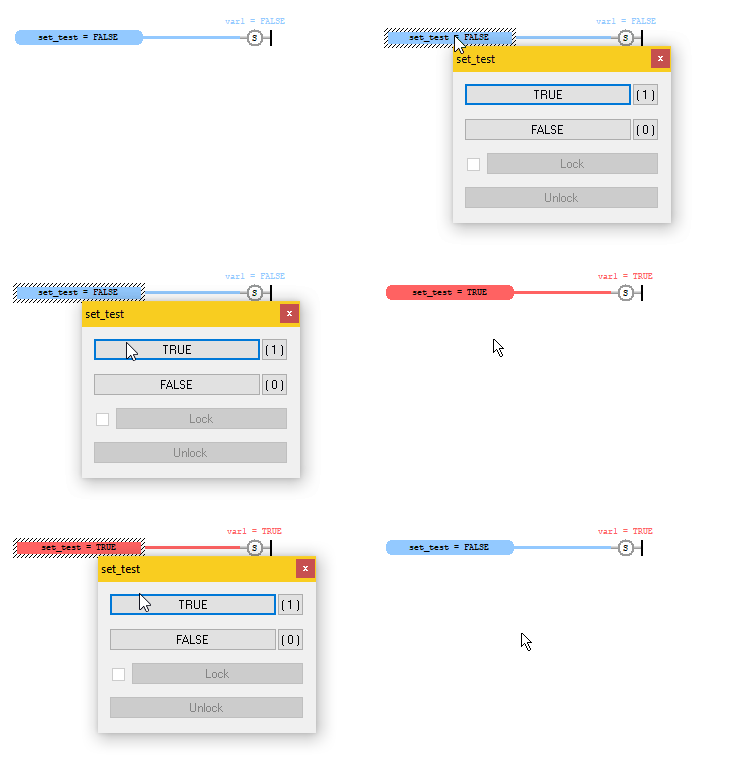
Below is an example of setting a Boolean variable. Note that the gray box on the left indicates a variable. This is generally used for non-binary variables (INT, WORD, etc.) or when using a Boolean as an input (as in this case). The circle on the right is called a coil, which essentially places a Boolean on the receiving end of a function. The “S” in the circle indicates that this is a Set coil.
By connecting the Boolean variable set_test to the Boolean variable var1 within a Set coil, you can toggle the value of set_test to set var1 to TRUE. Note that var1 stays TRUE after set_test is set back to FALSE.
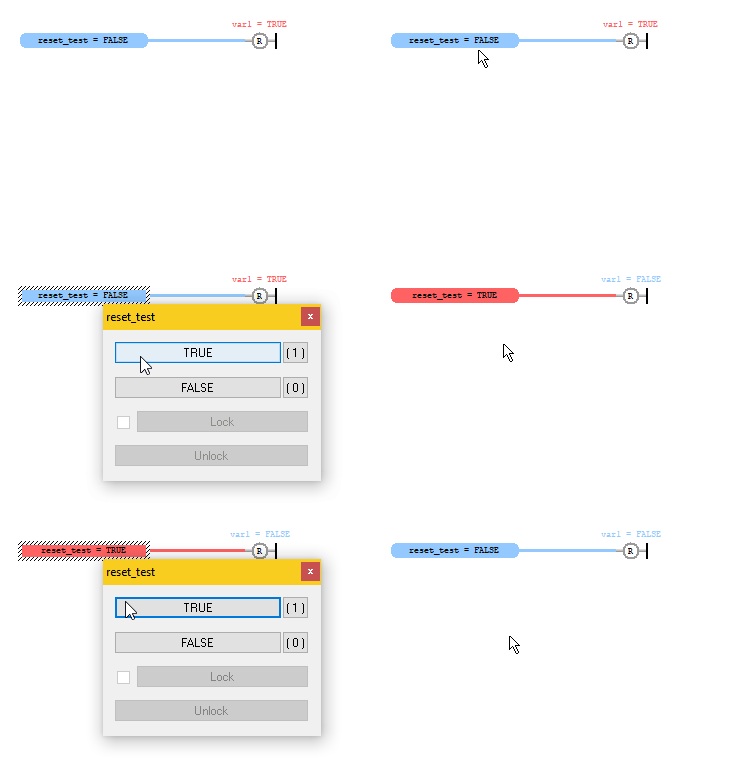
Similarly, a Reset coil – indicated by “R” – can be used to set a Boolean to FALSE.
TON Function Block (ON Delay Timer)
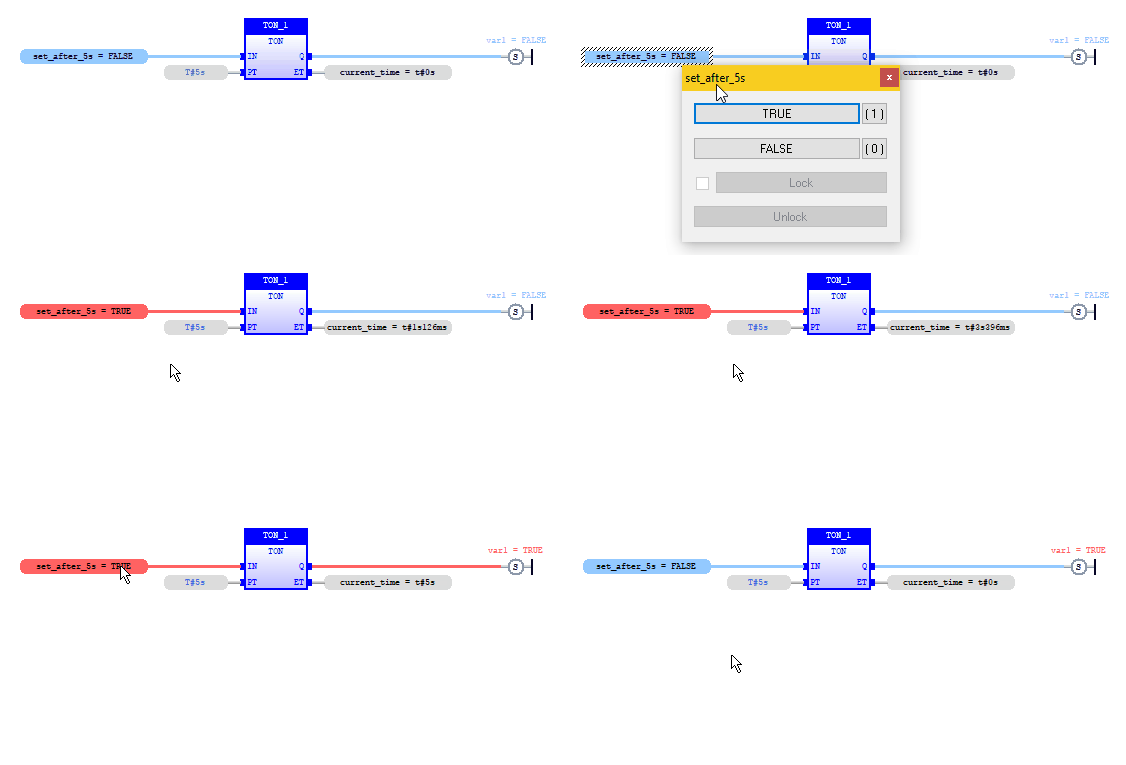
Another common operation is to enable an output after a certain amount of time. The way to achieve this is to use a TON function, otherwise known as an ON delay timer. When the TON function is enabled (IN = TRUE), it receives an input amount of time (PT) and waits for that amount of time to elapse before enabling the output (Q). TON functions typically have another output variable ET which reports the amount of time elapsed from the time the function was enabled to the end time PT.
Note below that var1 is not set to true until the TON function is enabled for at least 5 seconds. The TON function is reset so it can be used again by disabling the input IN.
PLC Programming Example: Traffic Light Control in FBD
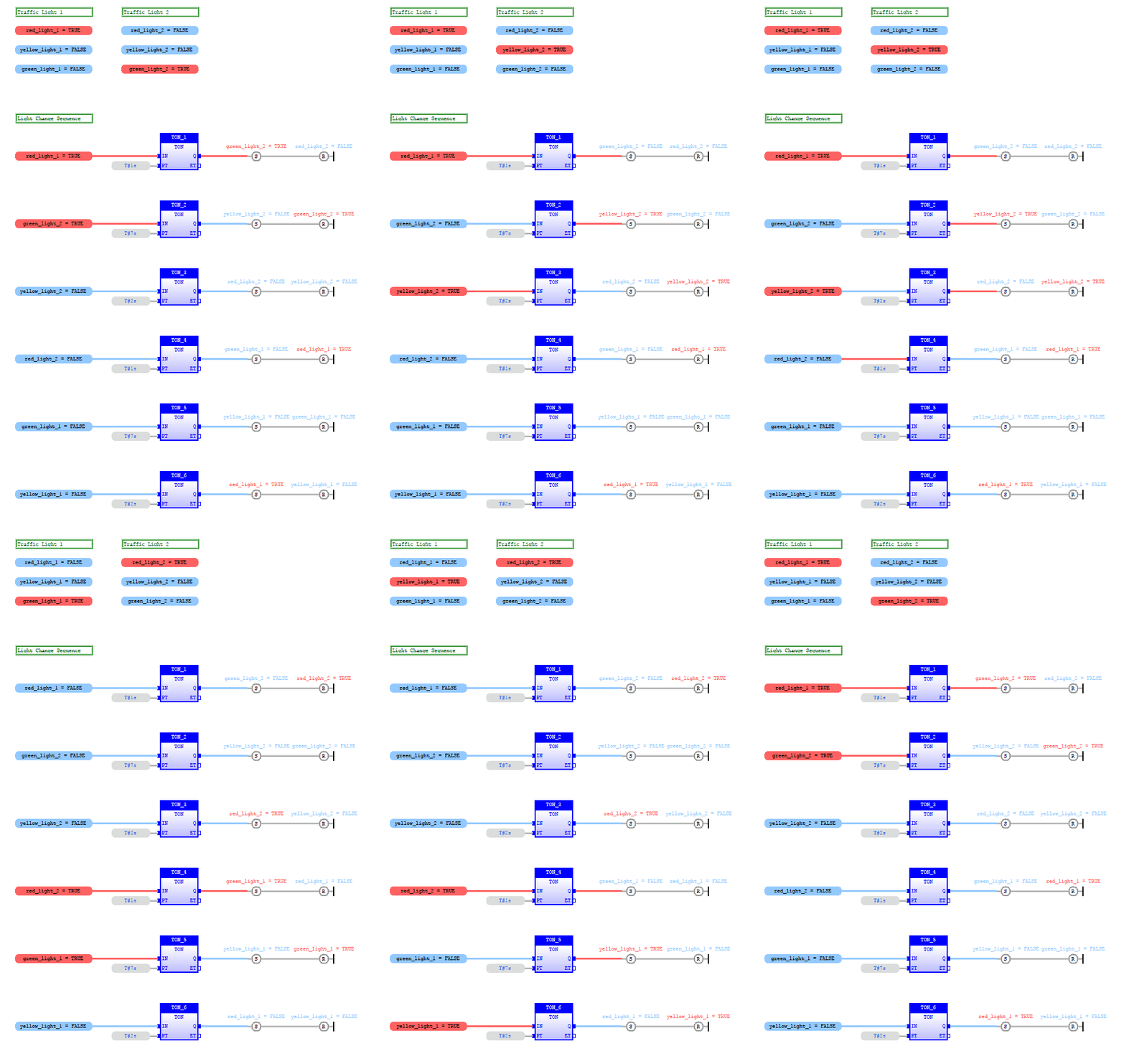
Even just using these few basic PLC programming concepts, one can get a long way in practical applications. Here is an example PLC program that employs only the concepts already discussed. Note that comments are in green text boxes. Also, there is no need to define the ET output in a TON function if it will not be used.
A key takeaway from this example is the overall program structure. At the top of the program, look at the traffic light displays. These serve no purpose other than to represent two traffic lights at an intersection. This demonstrates my favorite reason to program via FBD, which is to take advantage of visual cues to test your program.
Beneath that is the control logic, determining the light change order and timing. There are many ways to program this sequence, but I highly recommend keeping the implementation as simple as possible. I personally chose to structure the sequence in this way because each state of the sequence is clear according to variables on the left. And within each line of the sequence, it is easy to tell what changes by the end of that line.
Final Thoughts: Learning by Doing
At Sparx Engineering, we believe the best way to learn PLC programming is through hands-on application. Starting with small projects like the traffic light controller helps build foundational skills for real-world automation systems.
💡 Reminder: Each PLC brand (Siemens, Allen-Bradley, etc.) has its own software interface for downloading, compiling, and debugging. Refer to your vendor’s manual for step-by-step details.
Note that this introduction does not cover compiling or debugging, as those procedures vary between PLC manufacturers, which usually employ different programming software. Most PLC software manuals cover this in detail for their specific products, so further reading will be necessary in that area.
I hope to cover more PLC programming examples, useful functions, and general tips in the future, so stay tuned!